The recent wave of exposed OpenClaw instances is a useful forcing function for thinking carefully about what "securing an AI agent" actually means at the infrastructure level. This post walks through the choices we made when building Coral and the reasoning behind them. It also covers what our architecture doesn't protect against — because no system eliminates all risk.
For background on the exposure crisis, see: The OpenClaw Security Crisis of 2026.
Contents
- The Core Problem We Designed Around
- No Public IP for Any Sandbox
- All Network Traffic Is Proxied and Authenticated
- Isolated VMs with Encrypted Storage
- Credential Isolation
- Managed vs. Self-Hosted: The Security Tradeoff
- What We're Honest About
- Comparison Table
The Core Problem We Designed Around
The majority of exposed OpenClaw instances share a common pattern: a user wanted always-on access, deployed to a cloud VPS, and either didn't configure a firewall or didn't set up authentication. The result: the OpenClaw gateway port is open to the internet, and anyone who finds it has full control of the agent — including every account the agent is connected to.
This isn't a bug in OpenClaw. It's a consequence of deploying local-first software to a network-accessible environment without the infrastructure to support it. The fix isn't just a config change — it requires a different deployment architecture.
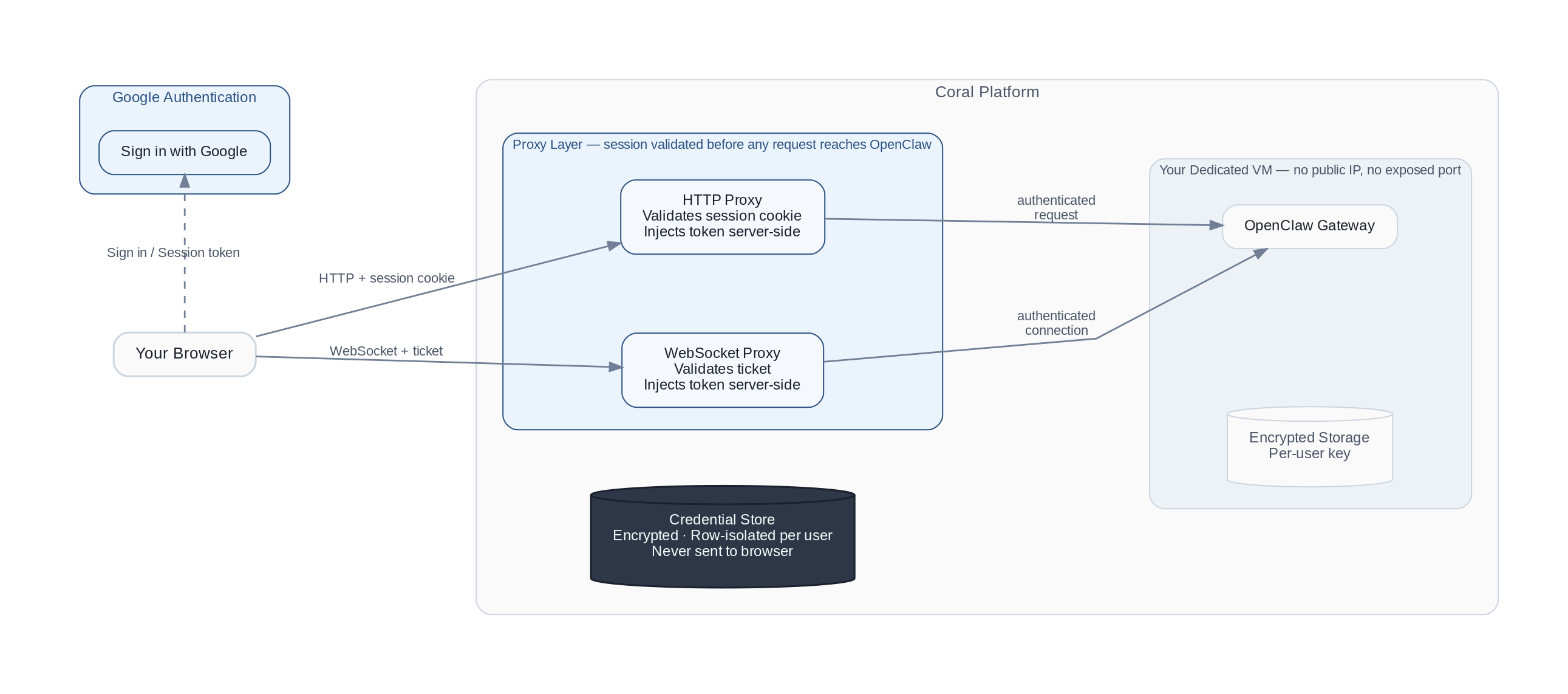
No Public IP for Any Sandbox
Every Coral sandbox runs in a dedicated VM. There is no per-user public IP address.
Traffic reaches a sandbox only through our internal infrastructure. From the public internet, there is no way to address an individual sandbox directly, and the OpenClaw gateway port is never exposed.
This means the sandbox is not discoverable by internet scanners. Network-level attacks against individual instances from outside our infrastructure are not possible.
Contrast with self-hosted: A raw VPS instance gets a dedicated public IP. Unless the user explicitly configures a firewall, the gateway port is open by default and discoverable within hours.
All Network Traffic Is Proxied and Authenticated
Every request to a Coral sandbox — whether HTTP or WebSocket — passes through an authenticated proxy layer before reaching the OpenClaw gateway. The proxy sits between the browser and the sandbox, and it enforces authentication regardless of what the OpenClaw application does internally.
The flow works like this:
- The browser authenticates through Google authentication and receives a session token
- All gateway requests are forwarded through our proxy, which validates the session and injects the gateway credential server-side
- The browser never receives or handles the gateway credential directly
This layering matters: if a vulnerability in the OpenClaw application could otherwise bypass its own auth checks (as some CVEs have demonstrated), the proxy layer remains as an independent enforcement point.
Why this matters for ClawJacked (CVE-2026-25253): The ClawJacked attack works by connecting to the gateway WebSocket from a malicious website. That requires the WebSocket endpoint to be directly reachable from a browser. In Coral, there is no directly reachable WebSocket endpoint — all connections go through our authenticated proxy first.
Contrast with self-hosted: Authentication happens inside the OpenClaw application. There is no independent outer layer.
Isolated VMs with Encrypted Storage
Each Coral user gets a dedicated VM — not a shared container or a namespace on a shared host. Each sandbox has its own isolated CPU, memory, and filesystem.
Storage is encrypted per user. Backups are automated and encrypted.
Why this matters: On a shared VPS, OpenClaw's credential files share a host with other processes. A privilege escalation on the host can reach another user's agent. With dedicated VMs, there is no lateral path between users.
Credential Isolation
The gateway credential — the token that grants control of an OpenClaw instance — is stored server-side in a row-isolated, encrypted database. It is never transmitted to the browser in any response.
The browser receives a time-limited session token. Even if a browser session were compromised, the attacker would not obtain the underlying gateway credential.
Contrast with self-hosted: Users typically enter the gateway token directly in the browser, where it lives in browser memory and travels on every request.
Managed vs. Self-Hosted: The Security Tradeoff
The question we hear most is: "Isn't self-hosting more secure because I control everything?"
The honest answer is: it depends on what you do with that control.
Self-hosting gives you full authority over your infrastructure — which is a genuine advantage if you apply it. But the data from the exposure crisis suggests most self-hosters don't: 93.4% of verified exposed instances had critical auth vulnerabilities, most didn't configure a firewall, and many were running outdated versions.
The same pattern appears across cloud computing broadly. The majority of cloud security incidents stem from customer misconfiguration, not provider vulnerabilities. The infrastructure can be correctly configured; often it isn't.
A managed platform shifts the responsibility. You're trusting the platform to handle firewalls, authentication, encryption, and patching. In exchange, you give up some control. That tradeoff makes sense when:
- You don't have dedicated security engineering resources
- You want to use OpenClaw without becoming an infrastructure expert
- The cost of misconfiguration (compromised email, leaked credentials, data exfiltration) exceeds the cost of the platform
This is the same tradeoff that moved most organizations from self-hosted email and databases to managed services. Self-hosting done well is more secure than any managed platform. Self-hosting done carelessly is not.
What We're Honest About
Platform dependencies. Our authentication and data infrastructure are managed services. If those providers experience a breach, it could affect us. We monitor their security advisories and have incident response procedures, but the dependency exists.
OpenClaw application vulnerabilities. Sandboxes run OpenClaw, which has had 90+ security advisories. We apply patches via in-place upgrades as quickly as possible, but there is a window between disclosure and patch deployment where a sandbox-level vulnerability could be exploited by someone who already has an authenticated session.
Trusted user actions. If you connect your primary email to your agent and the agent misbehaves, Coral's infrastructure doesn't override that — the agent acts within the permissions you granted. Our architecture reduces external attack surface; it doesn't change what an authorized agent can do.
The right mental model: Coral addresses the infrastructure-level risks that cause the vast majority of OpenClaw security incidents: network exposure, auth bypass, and credential leakage. It doesn't eliminate all risks. You should still treat your agent like a new employee — don't connect accounts you can't afford to lose, start with narrow permissions, and expand access as trust builds.
Comparison Table
| Risk | Raw Self-Hosted VPS | Coral |
|---|---|---|
| Public IP exposure | Dedicated IP; gateway port scannable by default | No public IP for sandboxes; internal routing only |
| Gateway authentication | Manual setup required; many instances never configured | Mandatory; enforced at proxy layer before reaching OpenClaw |
| WebSocket attack surface | Gateway WebSocket directly reachable from any browser | WebSocket behind authenticated proxy; no direct browser access |
| Credential storage | Plaintext local credential files | Server-side in isolated, encrypted database; browser gets session tokens only |
| Sandbox isolation | Shared host OS with other processes | Dedicated VM per user |
| Storage encryption | Manual, or not done | Automated, per-user |
| Security updates | Manual; many instances never updated | In-place automatic |
| Audit trail | Local files only | Operational logs shipped off-sandbox |
If you're currently running a self-hosted OpenClaw instance and want to move to a managed setup, Coral handles it for you. If you prefer to keep self-hosting, see our docs for step-by-step instructions:
- Harden Your Self-Hosted Instance — Firewall, auth, reverse proxy, skill auditing, and more
- Terminate Your Instance — Shut it down on AWS, GCP, DigitalOcean, Oracle, Tencent, Alibaba, Baidu, Hetzner, or Kamatera
Or see our security best practices guide and crisis response post for background and context.